Free & Open Source

Blind Card

by Sugoi Audio

Hear the truth. Not the brand.

A free AU/VST3 plugin for blind testing inside your DAW—plus a standalone app where you can drag & drop audio files directly. Compare tracks, rate, guess, or quiz yourself—without knowing which is which.

AU / VST3 / Standalone (macOS / Windows)
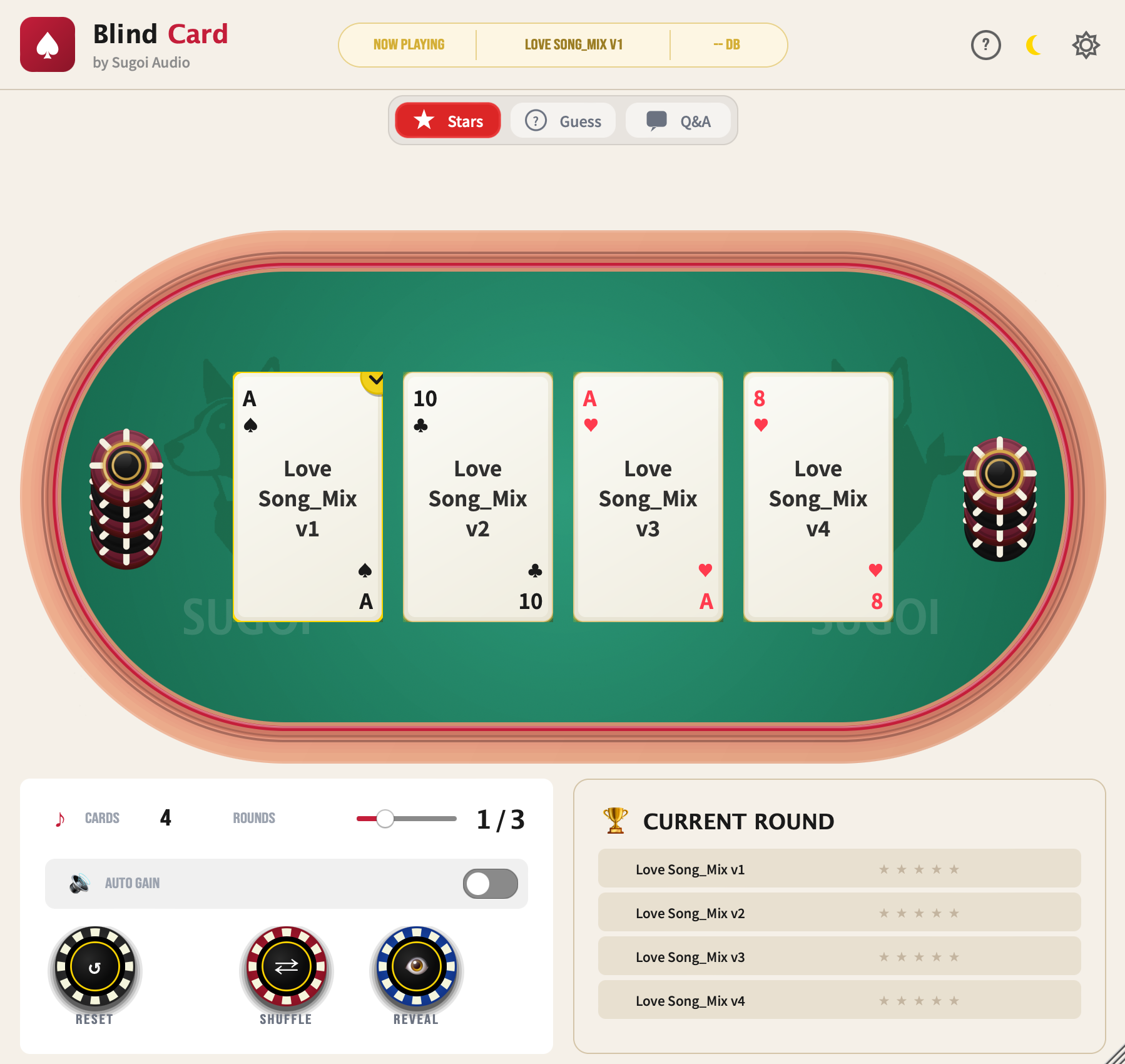
Blind Card plugin interface showing poker table with 4 audio cards for blind A/B testing

Available as AU/VST3 plugin for your DAW, or as a standalone app — just drag & drop your audio files

Why Test Blind?

Our brains are wired to be influenced by what we see. Expensive plugin? Must sound better. Famous brand? Obviously superior. But is it really?

Blind testing removes visual bias so you can judge audio purely by how it sounds. Make decisions based on your ears, not your assumptions.

Two old ways.
Both flawed.

Traditional blind testing methods are cumbersome and easy to cheat.

Track A Track B Track C

Rename Tracks Manually

Rename your tracks to "A", "B", "C" and try to forget which is which.

You'll remember the order. Your brain can't unsee what it already knows.
👁 blocked

Cover Your Screen

Put tape over your monitor or ask someone else to click for you.

Impractical. Can't navigate your DAW. Requires another person.

There's a better way. And it's actually fun.

Blind Card hides your tracks behind poker cards—randomly shuffled every time. You'll never know which is which until you're ready to reveal.

Insert. Shuffle. Listen. Reveal.

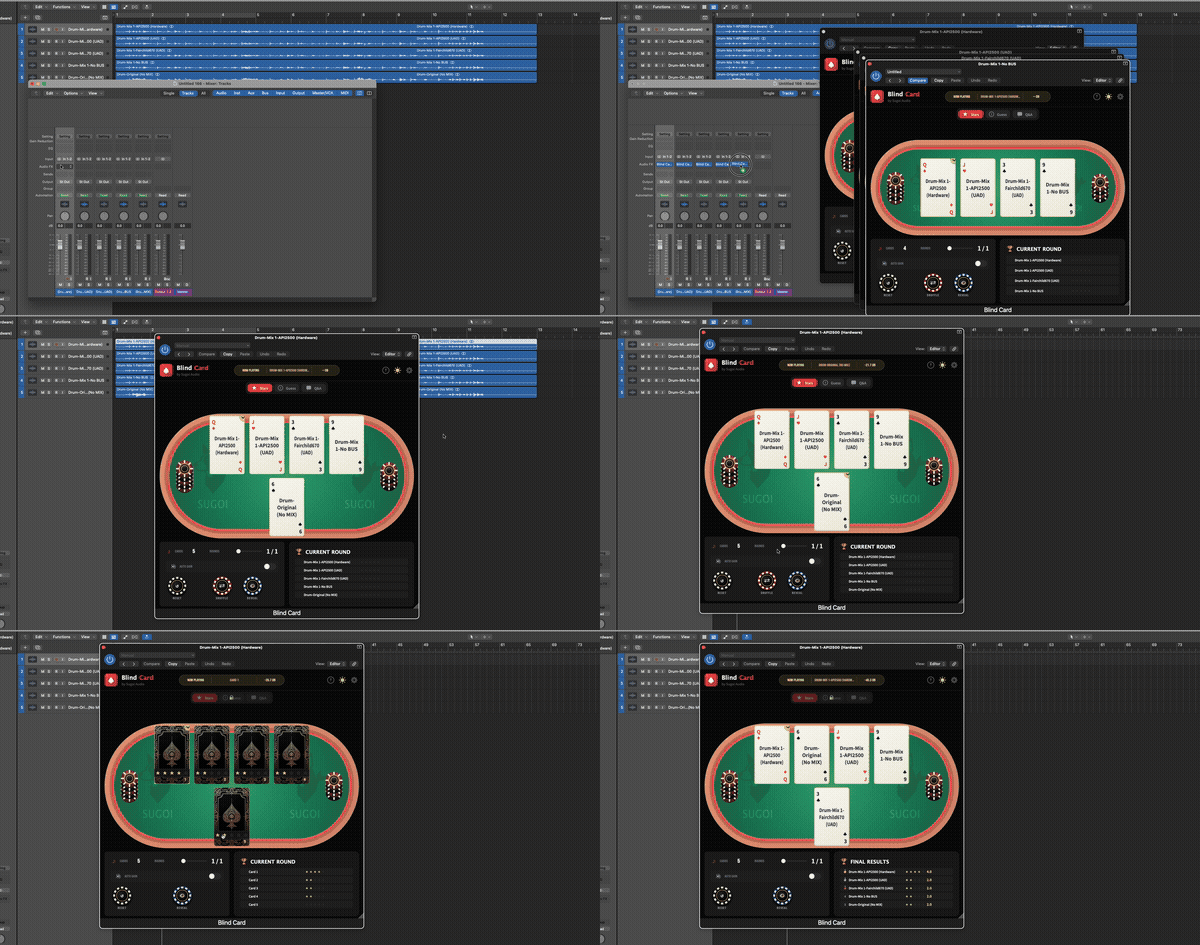
Put Blind Card on each track you want to compare. Hit shuffle, and the cards are dealt. Listen, rate, guess—then reveal the truth.

🎛️

In Your DAW

  1. 1. Insert Blind Card as an effect plugin on each track you want to compare (2-8 tracks)
  2. 2. All plugin instances auto-sync—they share the same game state
  3. 3. Click a card to solo that track; click again to switch instantly
  4. 4. Use your DAW's transport normally—Blind Card just controls muting
📁

Standalone App

  1. 1. Drag & drop audio files directly into the app (WAV, MP3, AIFF)
  2. 2. Files are automatically loaded as cards—no DAW needed
  3. 3. Perfect for comparing reference tracks, masters, or plugin renders
  4. 4. Same blind testing features—just without the DAW
1

Insert

Add Blind Card to 2-8 tracks

2

Shuffle

Cards randomly hide track names

3

Listen

Compare tracks without bias

4

Reveal

Discover which track was which

BlindCard shuffle animation demo - cards being shuffled and revealed
Try It Now

Experience Blind Testing

Try the core blind testing experience right here in your browser.

Rounds:

🎧 Drum Mix Blind Test - Click cards to listen, then rate with stars

A Track A
K Track B
Q Track C
J Track D
10 Track E
RESET
SHUFFLE

Click stars to rate each track

This is a visual demo. In the real plugin, you'd hear actual audio samples.

Three Ways to Test

Choose Your Game

Different testing modes for different needs. Rate quality, test your ears, or quiz yourself.

Stars Mode

Rate each track from 1-5 stars based on quality. Perfect for evaluating mix revisions or comparing different plugins.

🎯

Guess Mode

Try to identify which card matches which original track. Test if you can really tell the difference between options.

Card A = ? Track 2

QA Mode

The system asks questions like "Which card is the LA-2A?" Click to answer and get scored on your accuracy.

"Which card is the Vintage Comp?"

Everything You Need

Built for serious audio comparison. Fun enough to actually use.

🃏

Poker Card UI

Each track becomes a playing card. Flip animations, casino vibes.

🔊

Auto Level Match

LUFS-based loudness matching. Louder ≠ better anymore.

🌐

5 Languages

English, 繁體中文, 简体中文, 日本語, 한국어

🌙

Dark / Light Theme

Match your DAW. Your eyes will thank you.

💻

Standalone App

Compare audio files without a DAW. Load WAV, MP3, AIFF.

🔓

Open Source

AGPL-3.0 license. View, modify, contribute on GitHub.

🎲

2-8 Cards

Compare anywhere from 2 to 8 tracks at once.

🔁

Multi-Round

Run multiple test rounds. Shuffle again to confirm results.

📊

Results Panel

See your ratings, guess accuracy, and test statistics.

Two Ways to Use

Use as a plugin in your DAW, or standalone for quick file comparisons.

Plugin Mode

Insert Blind Card on multiple tracks in your DAW. All instances sync together—shuffle once, and every card is randomized. Perfect for comparing:

  • Different compressor plugins on the same track
  • Mix revisions (v1 vs v2 vs v3)
  • Microphone shootouts
  • Preamp or converter comparisons

Standalone Mode

No DAW needed. Load audio files directly into the standalone app for quick A/B/C comparisons. Supports WAV, MP3, and AIFF.

  • Compare mastered files
  • Test codec quality (MP3 vs FLAC)
  • Sample library shootouts
  • Quick reference checks

System Requirements

Runs on modern macOS systems.

macOS

  • macOS 10.15 (Catalina) or later
  • Apple Silicon (M1/M2/M3) native
  • Intel (x86_64) supported

Plugin Formats

  • AU (Audio Unit)
  • VST3
  • Standalone Application

Hardware

  • 4 GB RAM minimum
  • 100 MB disk space
  • 1280x800 display or larger

Frequently Asked Questions

What is blind listening testing? +

Blind listening testing removes visual cues (like track names or plugin brands) so you can judge audio purely by how it sounds. This eliminates confirmation bias and helps you make more objective decisions about your mixes.

Is Blind Card really free? +

Yes! Blind Card is completely free and open source under the AGPL-3.0 license. No trials, no limitations, no subscriptions. You can even view and contribute to the source code on GitHub.

What DAWs does Blind Card support? +

Blind Card works with any DAW that supports AU (Audio Unit) or VST3 plugins on macOS, including Logic Pro, Ableton Live, Pro Tools, Cubase, Studio One, Reaper, and more.

How does automatic level matching work? +

Blind Card measures the LUFS loudness of each track and automatically applies gain compensation so all tracks play at the same perceived volume. This prevents louder tracks from sounding "better" just because they're louder—a common bias in audio comparison.

Can I use Blind Card standalone without a DAW? +

Yes! Blind Card includes a standalone application where you can load audio files (WAV, MP3, AIFF) directly and compare them without needing a DAW. Great for quick file comparisons.

How do multiple plugin instances stay in sync? +

All Blind Card instances share a central game state. When you shuffle or reveal on any instance, all other instances update automatically. This is what makes multi-track blind testing possible.

Does Blind Card work on Windows? +

Currently, Blind Card is macOS only. Windows support may be added in future versions—the codebase is cross-platform ready. Check the GitHub repository for updates.

How can I contribute to the project? +

Blind Card is open source! Visit our GitHub repository to report bugs, suggest features, or submit pull requests. We welcome contributions from the community.

Documentation

Need Help?

Everything you need to get started with BlindCard and master blind listening tests.

Ready to Test?

Download Free

No sign-up required. No trials. No limitations. Just download and start testing.

Current Version: 1.0.0

Formats: AU, VST3, Standalone | macOS 10.15+

License: AGPL-3.0