New Release

AirCheck.

Your DAW audio. Unchained.

Instantly route your DAW audio to AirPods, Bluetooth headphones, or your phone. No driver switching. No crashes. Just check.

Available for AUv3 (Mac) & VST3 (Mac/Win)

[ Demo Video Placeholder ]

Why Check on AirPods?

AirPods have become the world's most popular headphones. If your mix doesn't translate well to how most people listen, you're missing the full picture.

The old way is slow and risky.

Checking mixes on AirPods used to mean compromising your workflow.

Exporting audio to MP3

Method 1: The Bounce

Exporting to MP3 just to listen.

Problem

You can't fix mistakes in real-time, killing your creative momentum.

DAW audio driver preferences

Method 2: The Driver Switch

Changing DAW output to AirPods.

Problem

Risks crashing large sessions and wastes minutes switching back and forth.

AirCheck routes your mix to AirPods instantly—without touching a single preference.

Simple. Intuitive.

One click to check your mix.

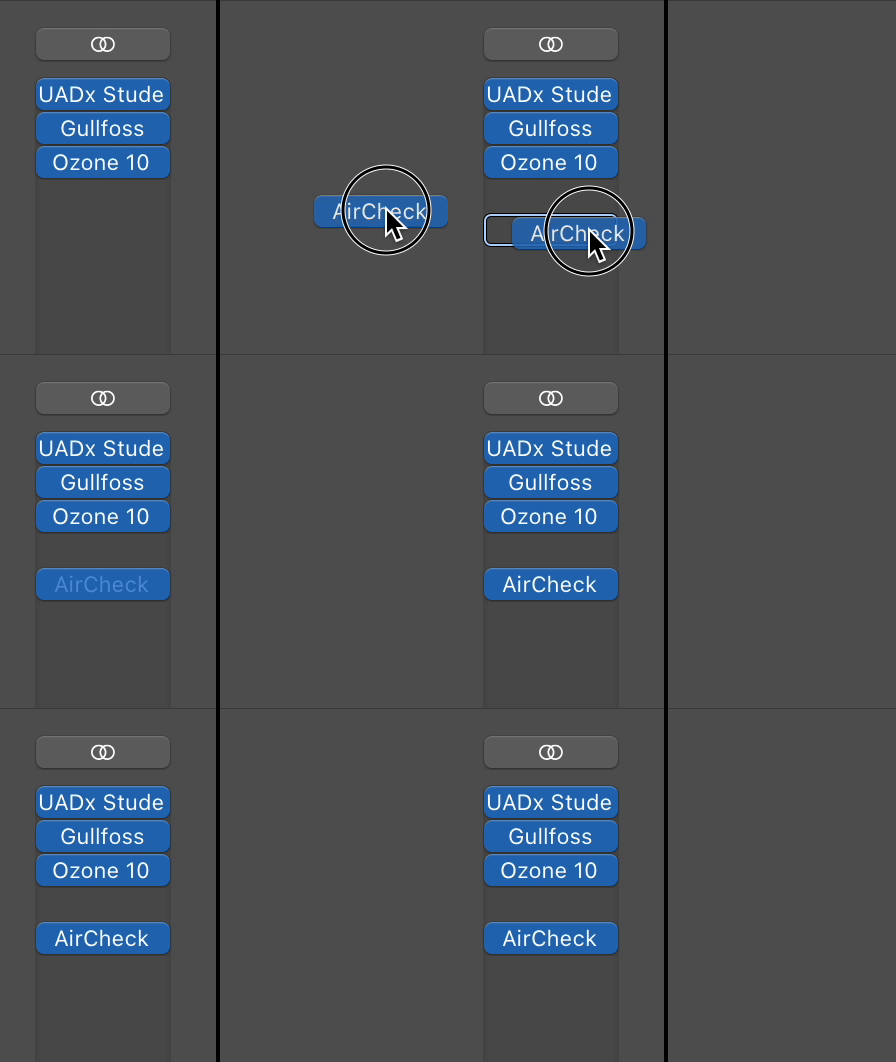
AirCheck in Master Bus Plugin Chain

Place it on your Master Bus

AirCheck Plugin Interface

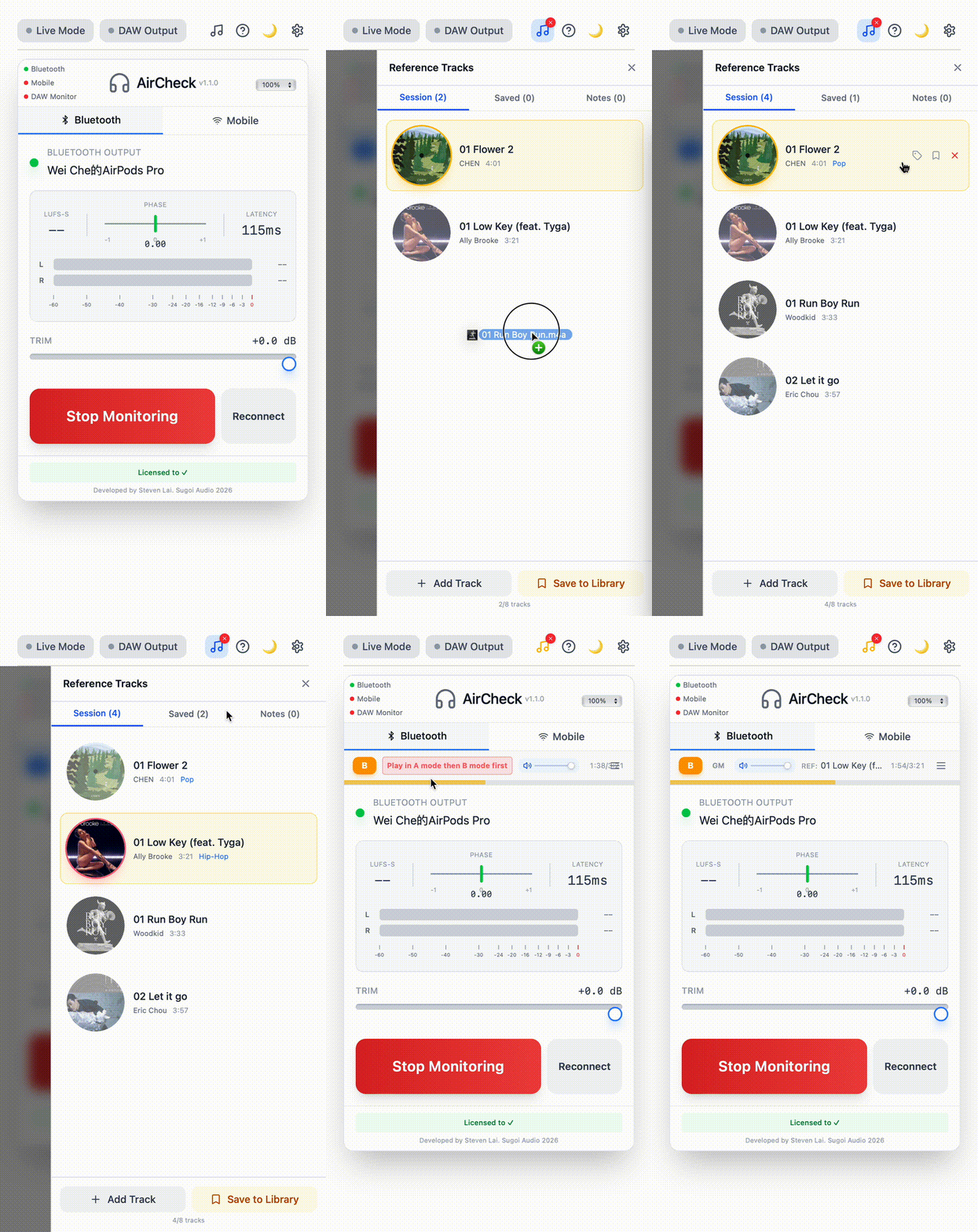
Toggle on to check

Load. Pair. Listen.

Simply place AirCheck on your Master channel. We handle the routing directly to your AirPods. No bouncing files. No switching drivers. Just music.
New in V1.0.1

Mobile Streaming

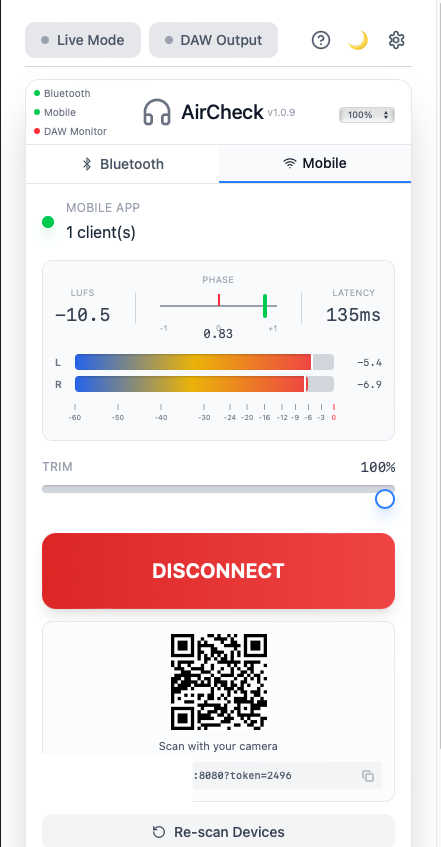
Stream your mix to any smartphone over Wi-Fi. Check your music on the go—no app required.

📱

Scan & Listen

Scan the QR code with your phone, and instantly hear your mix through any browser.

🌐

No App Required

Works with any web browser on iOS or Android. Just open the link and listen.

Low Latency (LAN)

Streams over your local network with ~300ms latency. No internet required.

Waiting for connection...

http://192.168.1.42:8080

Mobile Streaming Active
New in V1.0.1

Professional Metering

Logic Pro-style metering panel. Monitor your levels, phase, and loudness in real-time.

📊

Peak Level Meters

L/R stereo meters with dB scale from -60 to 0 dB. See your levels at a glance.

🔁

Phase Correlation

Monitor stereo phase from -1 to +1. Catch phase issues before they become problems.

🔊

LUFS Loudness

Short-term LUFS measurement for streaming-ready mixes. Target -14 LUFS with confidence.

SIGNAL
Metering Panel
Level: Peak
L
-17.6 dB
R
-17.0 dB
Correlation
+0.95
LUFS -14.2

It's almost like magic.

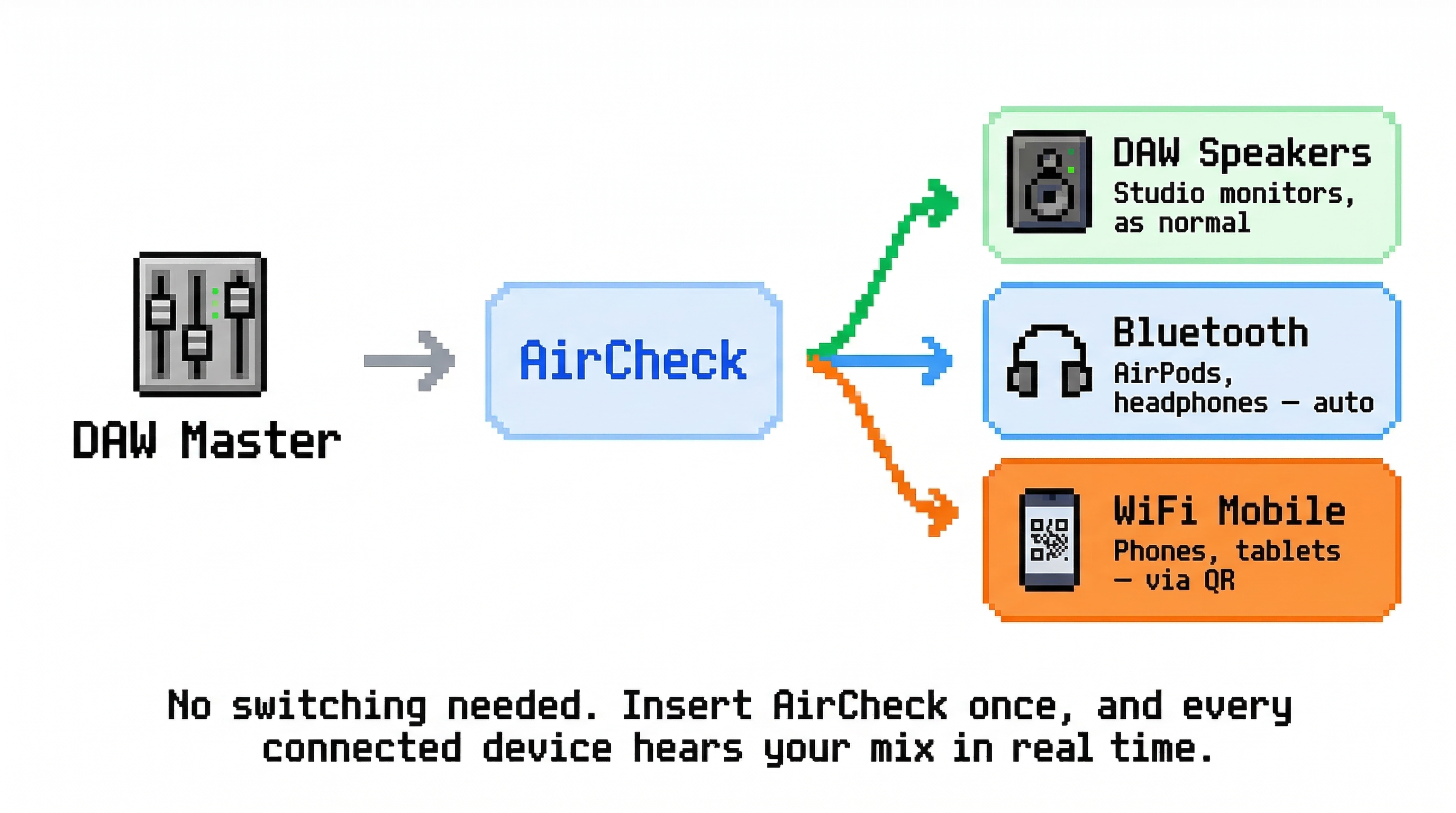
DAW Master
AirCheck
Plugin
AirPods / System

Instant Routing

Route audio directly to System Output without touching your DAW's Preferences menu.

Built for macOS & Windows

AUv3 Ready
VST3 Ready
AAX Coming Soon

Supported DAWs

Ableton Live · Cubase · Studio One · FL Studio · REAPER Bitwig · Nuendo · Digital Performer

Logic Pro & GarageBand (macOS only)

* Pro Tools (AAX) not yet supported

44.1 / 48 / 96 / 192

kHz Sample Rate Support

Stereo

2 Channel Output

Auto

Device Detection

0 dB

Volume Control

  • No driver switching required
  • No Core Audio resets
  • Works with AirPods, AirPods Pro & AirPods Max
  • Automatic reconnection on device change

Zero Friction

Keep your session running. No reloading plugins. No Core Audio resets. Stay in flow.

Get AirCheck

$24.99
$ 14.99
Early Bird Price
Buy Now

One-time purchase. Forever yours.

14-day money-back guarantee

Try Free Demo

Demo: 1 sec white noise every 30 sec during playback

Simple Insert

Just place it on your Master Bus. Toggle on to check, toggle off to mix.

NEW

Mobile Streaming

Stream to your phone via Wi-Fi. Scan QR code, listen in any browser. No app needed.

NEW

Pro Metering

L/R Peak levels, Phase Correlation, and LUFS loudness. Logic Pro-style meters built-in.

System Requirements

🍎 macOS

  • macOS 11 Big Sur or later
  • Apple Silicon (M1/M2/M3/M4) & Intel supported
  • AUv3 & VST3 supported
  • 64-bit only

🪟 Windows

  • Windows 10 or later
  • VST3 supported
  • 64-bit only

🎧 Audio

  • AirPods, AirPods Pro, or AirPods Max
  • Any Bluetooth audio device
  • System default output device

Need Help Getting Started?

Choose the guide that fits your needs.

Questions? Answers.

Everything you need to know about AirCheck.

What's the latency? +

The total latency is approximately 70–150ms, which includes buffer latency (~10–90ms depending on your DAW's buffer settings and Live Mode) plus Bluetooth transmission delay (~60ms). This is designed for monitoring and reference checking, not real-time tracking.

How do I install it? +

Download the installer, run it, and the plugin will be installed to your system's Audio Unit and VST3 folders. Then simply load AirCheck on your master bus in your DAW.

Does it work with other Bluetooth headphones? +

Yes! While AirCheck is optimized for AirPods, it works with any audio output device on your Mac, including other Bluetooth headphones, speakers, or wired devices.

Will it interfere with my DAW's audio? +

No. AirCheck routes audio to your selected device independently without changing your DAW's audio device settings. Your interface stays connected and your session remains untouched. Note: When the plugin is active, your main monitor output will be muted to avoid double monitoring—you'll only hear audio through your AirPods.

Is there a trial version? +

Yes! AirCheck is free to download and use. In Demo mode, during music playback, the trial version will generate 1 second of white noise every 30 seconds. To remove this limitation, simply purchase a license and activate it in the plugin (one-time internet connection required).

What is Live Mode? +

Live Mode reduces latency by using smaller audio buffers (from ~100ms to ~70ms total). Enable it by clicking the LIVE button in the top-left corner. Note: This may cause audio glitches on some systems—use only when you need lower latency for critical monitoring.

Will AirCheck affect my bounce/export? +

No. AirCheck automatically bypasses during offline rendering (bounce/export), so your exported audio will be completely normal and unaffected.

Does AirCheck work on Windows? +

Yes! AirCheck now supports both macOS and Windows. Your purchase includes both versions.

How does Mobile Streaming work? +

Click the Mobile Streaming button in the plugin to generate a QR code. Scan it with your phone, and a web-based player will open in your browser—no app needed. Your computer and phone must be on the same Wi-Fi network (LAN).

Does Mobile Streaming require internet? +

No! Mobile Streaming works entirely over your local network (LAN). No internet connection is required—just make sure your computer and phone are connected to the same Wi-Fi.

What's the latency for Mobile Streaming? +

Mobile Streaming has approximately 300ms latency over LAN. This is suitable for reference listening and checking your mix translation, but not for real-time tracking.

Does AirCheck support Pro Tools? +

Pro Tools (AAX format) is not yet supported.

Can I control the volume independently? +

Yes. AirCheck has its own volume slider that controls the output level to your AirPods without affecting your DAW's master fader.

What channel formats are supported? +

AirCheck supports both stereo and mono audio. The input and output channel configuration must match.

What should I do if AirCheck stops responding? +

Click the Reconnect button to refresh the connection. This rescans available devices and automatically reconnects to your AirPods.

Why AirCheck?

See how AirCheck compares to other audio routing solutions.

🎧

Bluetooth Mode

AirPods / Speakers

Latency ~100ms
Internet Required NO
📱

Mobile Streaming Mode

Smartphone via Wi-Fi (LAN)

Latency ~300ms
Internet Required NO (LAN only)

← Swipe to see more →

Product Pricing Primary Use Case Internet? Setup
Sugoi AirCheck $14.99 (One-time) Local Monitoring
Bluetooth + Mobile Streaming
NO Local/LAN only Plug & Play
Waves Stream Subscription $29+/mo Remote Sharing
Send audio to clients via web
YES Wi-Fi dependent Medium
Rogue Amoeba Loopback $99.00 (One-time) System-Wide Routing
Podcast/Livestream setup
NO High
Manual virtual wiring
Audiomovers LISTENTO ~$16.99/mo (Subscription) Remote Collaboration
High-res streaming to others
YES Upload bandwidth heavy Medium
Source-Nexus $295.00 (One-time) Enterprise / Post-Pro
Connecting DAW to Zoom/Skype
NO High
Pro engineering setup
Ginger Audio GroundControl $249~499 (Caster/Sphere) Virtual Mixing Console
Livestreaming/OBS routing
NO High
Separate App & Mixer UI

Disclaimer: All product names, logos, and brands are property of their respective owners. All company, product, and service names used in this comparison are for identification purposes only. Use of these names, logos, and brands does not imply endorsement. Prices and features are based on publicly available information as of December 2025 and are subject to change without notice. "AirCheck" is a product of Sugoi Music Tech.

Support

Have any questions? We're here to help.
Feel free to reach out to us anytime.

support@sugoiaudio.com