CURVA User Manual
Everything on the pitch, explained — from the first kick to the last save.
Version 1.0.1 · AU / VST3 / AAX / Standalone · Free
How CURVA works
Pan
Left is left, right is right — your sound crosses the room as the ball crosses the pitch.
Brightness
As the shot climbs the tone opens up; as it drops it darkens. (This is the Filter.)
Doppler
Pitch rises on the approach, falls as it leaves — like a car speeding by.
Save
The keeper parries your sound back into the field — a deflection echo that follows the flight.
Color / Scene
The scene picks the colour of the light; Color sets how much of it warms your sound.
1. What is CURVA

CURVA turns any sound into a swerving shot across the stereo field — a football bending through the pitch. Two engines work together: MOVE sends your signal on a flight (pan, filter brightness and Doppler pitch all follow the ball's trajectory), and SAVE is the goalkeeper — a reactive deflection echo that parries the sound back into the field.
Shape the flight with the Spin and Loft knobs, or pick up the pencil and draw your own shot path straight onto the pitch. Fire flights on the clock (Move mode) or from your track's own transients (Kick mode). And when the number matters: at Mix = 0, CURVA is an exact, sample-accurate bypass.
CURVA is free, and runs as AU, VST3, AAX and Standalone on macOS (Universal, Apple-notarized), and VST3, AAX and Standalone on Windows. It also happily takes a mono track and outputs stereo — more on that in Output & Global.
2. Quick Start
Load a preset for your source
Open the PRESET menu (top right) and pick a category — Vocals, Bass, Drums & Percussion, and so on. Each of the 65 patches is scouted for its material. Kick-Off loads by default.
Set the flight
Drag Spin to bend the shot (sign = direction, amount = curve). Drag Speed to set how fast the ball travels; click SYNC to lock it to your session tempo.
Dial in intensity
Power is the master effect intensity — it scales the movement depth and the analog-style drive together, with loudness-matched auto-gain keeping levels fair.
Bring in the keeper
Raise Save past 50% and the goalkeeper deflects the shot into echoes. Drag the keeper left/right on the pitch to set where the echo bounces.
Blend
Mix sets effect depth on a single serial path — no comb filtering at partial settings, and 0% is a true bypass.
3. Toolbar — A/B, Copy, Undo & Presets

The strip along the top of the window is your technical area — substitutions, replays and the team sheet.
CURVA keeps two full snapshots of the entire plugin state. One button toggles A ↔ B. Copy writes the current side onto the other, so you can tweak from a known point and flip back to compare.
Unlimited undo and redo, from the toolbar buttons or the keyboard: ⌘Z / ⇧⌘Z on macOS, Ctrl+Z / Shift+Ctrl+Z on Windows.
Top right: ‹ › step through every patch in order; click the name to open the browser. Full details in Presets.
4. The Pitch
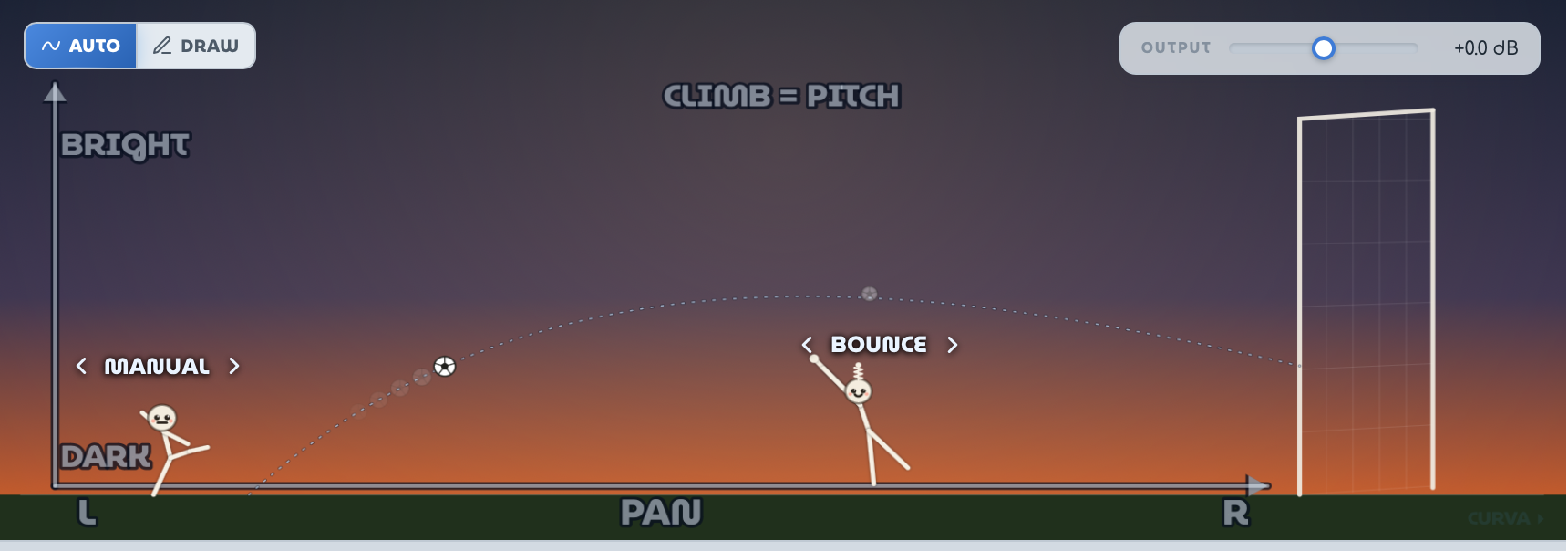
The stadium view is not decoration — the ball's flight is the sound. Horizontal position = pan, height = filter brightness, and the climb or dive of the path = Doppler pitch. Axis hints (PAN / BRIGHT–DARK / CLIMB = PITCH) appear on the field as a reminder.
AUTO vs DRAW (shot source)
AUTO (the default) — the trajectory comes from the Spin knob (banana curve) shaped vertically by Loft.
DRAW — pick up the pencil and freehand your own shot path on the pitch. The path is captured in draw order, so it may reverse, loop or cross itself — whatever you draw is what the sound flies. The stroke is lightly auto-smoothed. Click the trash button to clear and draw again.
Pencil Lock. A lock next to the pencil freezes the drawn path — while locked it can't be redrawn or cleared until you unlock it. The lock state is saved with presets, which is why factory presets that ship with a hand-drawn curve (Zigzag Runner, Whammy Dive, 808 Dive-Bomb, Rainbow Throw…) arrive locked: unlock to make the shot your own.
Drawn curves are saved with your session and inside presets. Switching back to AUTO keeps your drawing in memory; DRAW re-activates it.
Direct manipulation on the field
- Drag the goalkeeper left/right to set Keeper Pos — where along the flight the SAVE echo bounces back.
- The player selector (‹ name › above the striker) switches the striker character; the keeper selector above the goalkeeper switches the SAVE character.
5. Main Controls

| Control | Range (default) | What it does |
|---|---|---|
| Spin | −100…+100% (+50) | Bipolar. The sign picks the curve direction (left- or right-footed banana); the amount sets how hard the ball bends — which drives pan curvature and movement drama. 0 = straight kick. |
| Loft | −100…+100% (0) | Reshapes the AUTO-mode vertical flight (height = brightness). −100 = flat driven shot, 0 = symmetric arch, +100 = rising net-breaker. AUTO mode only; drawn paths are unaffected. |
| Speed | 0.1–20 Hz (2 Hz) | Flight rate. With SYNC on, the same knob selects a note division (1/1 … 1/32, incl. dotted & triplet) locked to the host tempo, and the flight aligns to the bar while the transport plays. |
| Power | 0–100% (45) | Master effect intensity: scales Pan/Filter/Doppler depth and the analog-style coloration drive together. Loudness-matched auto-gain keeps all settings at comparable level. |
| Mix | 0–100% (100) | Effect depth on a single serial path — partial settings never comb-filter. Mix = 0 is an exact bypass. |
| Save | 0–100% (0) | The goalkeeper. 0 = clean (no keeper). ~12–50% = graze: the keeper tips the ball — a brief near-miss flutter dip as the flight passes him. ≥50% = full save: the shot is parried back as a deflection echo. |
| Color | 0–100% (0) | Coloration amount — extra pre-saturation drive on top of Power, sitting beside the scene selector. Loudness-matched, so it adds harmonic warmth, not level. Gentle by design and always safe (it is before the final limiter). At 0 it adds nothing. |
6. Trigger Modes — Move & Kick
Two ways to put the ball in play. Move runs on the clock; Kick listens to the audio itself.
Continuous flight: the ball loops striker → goal on every LFO cycle. Choose the modulation wave (Sine / Tri / Saw) in the Advanced panel — Saw gives a hard reset each cycle; Tri and Sine are smoother round trips.
One-shot flights fired by the audio itself: any input transient (drum hit, pluck, onset) above the Sens threshold auto-fires a fresh flight. A new hit interrupts the flight in progress and re-kicks from the striker's boot. A manual Kick! button fires one by hand.
Kick-mode controls
| Control | Range (default) | What it does |
|---|---|---|
| Sens | 0–100% (55) | Trigger sensitivity — higher means smaller hits count as a kick. |
| Kick Attack | 0–500 ms (5 ms) | Shapes the launch of each audio-fired shot — a longer attack eases the flight in for a more natural onset. |
| Kick Release | 0–1000 ms (50 ms) | Shapes the settle after each shot — a smooth tail out, and no click when fast material re-triggers mid-flight. |
Kick Attack and Kick Release appear next to Sens whenever Kick mode is active.
7. MOVE — Flight Modulation

Open ADVANCED to reach the per-dimension depth controls in the MOD row. All of these are scaled by Power × Mix — think of Power as how hard the whole team is playing.
| Control | Range (default) | What it does |
|---|---|---|
| Pan | 0–100% (80) | Stereo width of the flight. The ball's left–right position on the pitch is the pan position. |
| Filter | 0–100% (60) | A brightness sweep that follows the ball's height: high in the air = open and bright, low on the ground = darker. This is the “air” of the shot. |
| Doppler | 0–100% (30) | Pitch bends with the ball's motion, like a fly-by: climbing = pitch up, diving = pitch down. Great for dives and risers; keep it low for subtle motion. |
| Low Anchor | toggle (off) | Keeps everything below ~120 Hz mono-safe and un-pitched: the dry sub band is preserved while the rest of the spectrum flies. Turn it on for bass, for 808s when you don't want the sub to dive, and for full mixes where the low end must stay planted. |
| Wave | Sine / Tri / Saw | The Move-mode LFO shape. Saw gives a hard reset each cycle; Tri and Sine are smoother round trips. |
| Chaos | 0–100% (0) | The striker plays himself: each new flight re-rolls the effective Spin and Loft around your settings. How wildly depends on the amount and on the selected character's temperament. 0 = fully manual. |
| Defend | 0–100% (0) | The keeper plays himself: on each cycle, this is the probability he darts to a random spot and makes a save (firing the SAVE echo) even if the main Save knob is low. It only adds saves, never removes them. |
8. SAVE — The Goalkeeper Echo

The SAVE engine is an additive stereo deflection echo — it never gates or cuts the dry signal. The Save knob on the main deck sets the amount; the Advanced SAVE row shapes the echo itself.
Echo controls
| Control | Range (default) | What it does |
|---|---|---|
| Time mode | Flight / Free / Sync | Flight (default) — the echo time follows the flight: it lands where the keeper stands (Keeper Pos × flight period), so speeding up the flight tightens the echo with it. Free — a fixed echo time on the Time knob. Sync — the Time knob selects a note division locked to the host tempo; no host tempo → falls back to the Free ms value. |
| Time | 10–1500 ms (300) / 1/1…1/32 (1/8) | Dual-purpose knob: disabled in Flight mode, a millisecond value in Free mode, a note division in Sync mode. |
| Feedback | 0–100% (60) | Echo tail length. 100% rides each keeper's own stability ceiling — the loop is self-limiting and can't run away. |
| Tone | 0–100% (50) | Shades the repeats from muffled/dark (0) through the keeper's native voice (50) to bright (100). |
| Save Level | 0–150% (100) | Independent wet output gain for the echo: 0 silences the echo entirely, up to 150% pushes it louder than the source. |
| Width | 0–200% (100) | True M/S stereo width of every keeper's echo and reverb wash. 0 = mono, 100 = unchanged, 200 = extra-wide. Phase-safe — it stays mono-compatible. |
The keeper roster
Switch keepers with the ‹ › selector above the goalkeeper. One echo engine, five characters — switching morphs smoothly (~30 ms) and never clicks:
The natural deflection — a full-range echo that follows the flight.
One short dead thud. No repeats, dark and dry — a gated-reverb slam that works as a rhythmic thickener.
A bright, fast slapback (~40–140 ms) — rockabilly reflexes.
Ping-pong: the ball bounces L↔R across the goal (~120–420 ms).
A long, haunted parry (~300–900 ms): the echo shimmers up and trails into a reverb wash. Pads, vocals and transitions love it. Phantom brings two controls of his own, below.
Phantom-only controls
These two appear for the Phantom keeper and are ignored by the other four:
| Control | Range (default) | What it does |
|---|---|---|
| Shimmer Pitch | −24…+24 st (+12) | The pitch the shimmer trail is shifted to. +12 is the classic octave-up; 0 means no shift; negative values sink the trail below the source. |
| Space | 5 characters (Ethereal) | Which reverb character the wash uses: Ethereal (default, a hand-tuned cloud), Gated Space, Gated Amb., Long Plate or Epic Hall. |
9. Players — Striker Characters
The ‹ name › selector above the striker loads a playing style into the Spin / Loft / Power knobs and flavours the Chaos randomness:
| Player | Style |
|---|---|
| Manual | The default — no style imposed; the knobs are all yours. |
| Curly | The playmaker: big banana curves (wide pan swerve). |
| Rocket | The sniper: flat, hard, driven shots (low arc, high Power). |
| Lofty | The lobber: high rising arcs (bright net-breakers). |
| Jinx | The wildcard: neutral base, but under Chaos he re-rolls everything, hard. |
Selecting a character (except Manual) writes its Spin/Loft/Power style to the knobs — you can still adjust them freely afterwards.
10. Scenes & Coloration

The scene row changes the time of day on the pitch — and the sound follows the light: each scene gives CURVA’s analog-style saturation its own colour and its own tone, from the bright, open sheen of Noon to the dark, thick warmth of Night. Switching scene re-colours the sound even at low Color — it is the saturation’s character, not a filter.
Soft, gentle warmth — bright-warm.
Clean, open sheen — the brightest.
Golden-hour saturation — warm, darker.
The darkest, thickest colour.
Color — how much of the light
Right beside the scene selector sits the Color fader — the coloration amount. The scene picks the colour of the light; Color sets how much of it warms your sound. Turning it up drives the signal harder into the saturation, adding harmonic warmth. Gentle by design, and always safe: it sits before the final limiter, so it can never push the output past the ceiling. At 0 it adds nothing — a project made before 1.0.1 loads exactly as it did.
The coloration is loudness-matched, so switching scenes — or raising Color — compares tone, not volume.
11. Output & Global
| Control | Range (default) | What it does |
|---|---|---|
| Output Level | −24…+24 dB (0) | Final master trim on the whole output — dry and effect together. At unity (0 dB), Mix = 0 remains an exact bypass. |
Mono → stereo
CURVA runs on a mono track and outputs stereo — drop it on a lone vocal, a bass or a single synth and it kicks the sound out into a wide stereo arc. Stereo tracks behave exactly as before.
12. Presets
The PRESET bar sits top right: ‹ › step through every patch in order; the name opens the browser.
The factory library holds 65 presets, grouped by category — hover a category and its patches fly out:
Featured is the showcase — Kick-Off loads by default. Characters holds the playful mascot patches. User is where your own saves appear; hover one and click the trash icon to delete it.
- Default Setting — resets to the factory default state.
- Save As… — names and saves the current state (including any drawn pencil curve) as a user preset.
- Export… / Import… — moves presets as files, for sharing or backup.
Presets that include a drawn path load with DRAW mode active — the curve appears on the pitch, ready to edit (unlock the pencil first) or clear.
Switching presets flushes the echo tail — no hot feedback ever carries over into the next patch.
13. Mix & Gain Staging
The plumbing, for the engineers. This is the part of the manual with no metaphors in it — almost.
- Mix is effect depth, not a parallel blend. CURVA runs a single serial path, so intermediate Mix values cannot comb-filter against a dry copy.
- Mix = 0 is an exact bypass — bit-transparent apart from the plugin's small fixed latency, which is reported to the host for automatic delay compensation. All other knobs can sit anywhere; at Mix 0 they do nothing.
- Power = 0 makes the flight silent-handed too: no movement depth, no drive.
- A final wet-gated safety limiter guards the output: whenever any wet path is active, it guarantees the output never spikes past ~0 dBFS — even at extreme Feedback, Save Level and Width settings. At Mix 0 it is out of the circuit entirely.
- The coloration stage is loudness-matched (RMS in vs. out), so Power and scene changes stay level-fair for A/B judgement.
14. Recipes
Vocal throw (chorus tail-out)
Vocals ▸ One-Two, or build it: Mode Move, SYNC on at 1/8, Pan ~45, Filter ~40, Doppler ~10, Save ~55 with Bounce, Save Time Sync 1/8, Feedback ~38, Mix ~35. Automate Mix up on the last word of a phrase and let the keeper carry it into the chorus.
808 dive-bomb
Bass ▸ 808 Dive-Bomb — a drawn dive path, Doppler ~70, Low Anchor off, because the sub pitch-dive is the effect. Honest note: with Low Anchor off, the low end is pitched and panned, so check mono compatibility before printing. For steady sub-bass duties use Sub Anchor instead (Low Anchor on, Pan 0).
Synth swirl
Synth & Keys ▸ Wing Play, or: Mode Move, SYNC 1/8, Spin ±60–80, Loft +40, Pan ~70, Filter ~55, Doppler ~15, scene Dusk for the richer voicing, Mix ~40–55.
Drum-bus stepper
Drums & Percussion ▸ Stepovers: Kick mode plus a drawn staircase — every hit above Sens fires a stepped pan/brightness pattern. Keep Doppler ≤ 25 so the kit doesn't detune, and nudge Kick Release up if fast fills click. Add the Wall keeper at Save ~55 for a rhythmic thud.
Haunted pad
Pads & Ambient ▸ Phantom Cathedral: slow flight (Speed ~0.35 Hz), Save 70 with Phantom — the shimmer trail plus reverb wash. Feedback ~50 keeps the cathedral breathing; try Shimmer Pitch at +7 for a fifth instead of the octave, and the Epic Hall space for the biggest room in the league.
15. Troubleshooting
| Symptom | Check |
|---|---|
| No movement? | Mix > 0 and Power > 0 — both scale every effect. In Kick mode the flight only runs after a trigger (a transient above Sens, or the Kick! button). |
| No echo? | Save must be ≥ 50% for a full deflection — 12–50% is the subtle graze. Also check Save Level isn't at 0. In Sync time mode without a host tempo, the Free ms time is used. |
| Low end wobbling / mono issues? | Turn on Low Anchor — sub-120 Hz stays dry, centred, un-pitched. |
| Sound is moving on its own? | Chaos or Defend is above 0 — the auto layer re-rolls the shot each cycle. Set both to 0 for fully manual behaviour. |
| Can't redraw or clear the curve? | The Pencil Lock is on — several factory presets ship locked. Unlock it next to the pencil. |
| Drawn curve gone after reopening? | The curve persists with the session and inside saved presets; the DRAW/AUTO switch remembers it. Clearing with the trash button is permanent. |
| Level jumps when switching scenes? | They're loudness-matched by design — if you hear a jump, it's the tonal colour, not gain. |
CURVA v1.0.1 — a free plugin from Sugoi Audio